

Applysent vs Sprout: auto-apply compared
By the Applysent teamLast updated 6 min read
Sprout is the better pick if you want a polished swipe-to-apply app on iPhone, Android and web, with replies tracked in a per-job inbox. Applysent is the better pick if you want a flat monthly allowance where a Workday application costs the same as any other, plus a receipt showing every field and answer sent.
We make Applysent, so weigh this accordingly.
The short verdict
Both tools do the same core job: you pick roles, they tailor your résumé, fill in the employer's form and submit it. The differences are in how you pay, how much they reach, and how much you can check afterwards.
Sprout charges in credits. Most jobs use 1, but Workday and other complex applications use 32. Applysent counts every submitted application as one, from a fixed 750 a month for $19.99.
Sprout's strengths are its mobile apps, its tracker and inbox, and guided questions that help fill gaps in your résumé5613. Applysent's are a flat allowance, field-level receipts, and strict rules about eligibility answers.
Side-by-side table
| Applysent | Sprout | |
|---|---|---|
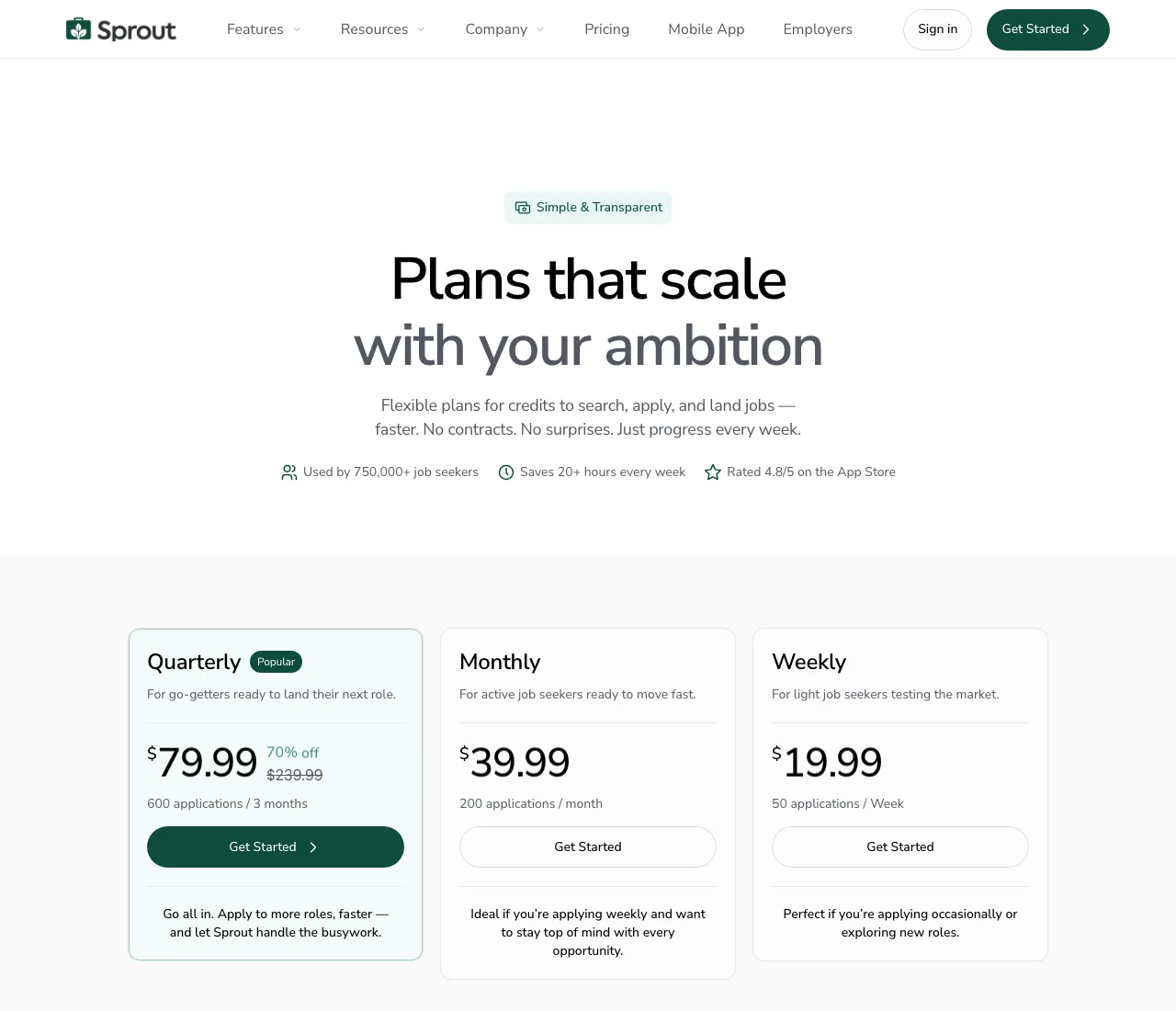
| Price | $19.99 a month for 750 applications; free for 7 days with the full plan (up to 175 applications a week on the monthly plan or 230 on the 3-month plan, card required) | 19.99 USD a week, $39.99 a month, or $79.99 per 3 months1 |
| Volume | 750 applications a month | 50 a week, 200 a month, or 600 per 3 months1 |
| How usage is counted | One per submitted application | Credits: 1 for standard jobs, 3 for Workday and other complex ones23 |
| Hiring systems | 12+ named: Lever, SmartRecruiters, Ashby, Workable, Recruitee, Greenhouse, Workday, Oracle Recruiting Cloud, Teamtailor, BambooHR, JazzHR and Paylocity | Not listed; sources jobs from company career sites, job boards and partners1 |
| Countries | Wherever employers on supported systems post | 20 countries listed7 |
| Review before sending | Review mode, or Autopilot inside your filters | Require Approval / Manual Review setting48 |
| Résumé and cover letter | Résumé tailored every time; cover letter when the form asks | Tailored résumé and cover letter per job1 |
| Record of what was sent | Receipt with every field and answer | Submission receipts, documents saved with each application4 |
| Failed applications | Released back to your allowance | Credit refunded automatically9 |
| Email used on applications | Never sends email as you | A Gmail alias or a Sprout-created whisperpost.io address10 |
| Apps | Web app that works on phones; iPhone app coming soon | iPhone, Android and web5 |
| Refunds | Cancel anytime; access to end of paid period | Full refund within 7 days if no credits used; partial use at Sprout's discretion11 |
How Sprout works (features from usesprout.com)
You build a profile once. When you swipe right on a job, Sprout can apply straight away or ask a few guided, job-specific questions first, then tailors your résumé and cover letter, fills in the form and submits it1. Skipping a job costs nothing; swiping right spends the credit shown on the job23.
Some employer sites need an account. Sprout creates one on your behalf where an application requires it and saves the login details under Application Credentials312. It explains that Workday-type jobs cost 3 credits because they involve creating accounts, multi-step forms and slow sites3.
Applications go out from a dedicated address: an alias of your Gmail if you connect it, or a unique whisperpost.io address if you don't10. Employer replies are forwarded to your personal inbox and kept in a per-job inbox in the app, and verification codes are handled during the application10.
If an application fails, the credit comes back automatically9. You can't retry it in the app; you finish it yourself on the employer's site9.
Cancelling is done from the app's settings, your phone's subscription settings, or a Stripe link if you paid on the website; for website payments, access runs to the end of the paid period15. Sprout's help center stresses that deleting your account does not cancel the subscription, so cancel first15. Unused credits expire at the end of the billing cycle2.
How Applysent works
You upload your CV and set filters. Applysent scores new roles against your profile; you swipe to pick matches in the web app, which also works in your phone's browser. For each one, it rewrites your résumé to match the posting's language without inventing experience, then fills in and submits the employer's own form.
You choose the mode. In review mode nothing is sent until you approve it, and you can edit the résumé or any answer first. Autopilot sends only inside your filters, match threshold and daily limit.
- Where it applies: Lever, SmartRecruiters, Ashby, Workable, Recruitee, Greenhouse, Workday, Oracle Recruiting Cloud, Teamtailor, BambooHR, JazzHR and Paylocity. It does not apply on iCIMS, Taleo, SuccessFactors, LinkedIn Easy Apply or Indeed.
- Receipts: every application gets a receipt listing each field and answer sent; employer confirmation emails are linked to it.
- Failures: a failed submission is released back to your allowance. If delivery is uncertain, it's marked uncertain and never re-sent on its own.
- Honest answers: minimum-qualification questions are never answered Yes automatically, and work-authorization answers come only from what your profile records. If your profile can't answer, you're asked.
- No duplicates: it won't apply twice to the same posting.
Where Sprout is stronger (mobile app, tracking, coaching features as listed)
- Apps on both phone platforms. Sprout has iPhone and Android apps plus a web app, synced across devices5. Applysent is a web app today; its iPhone app isn't in the App Store yet.
- Tracking built around email. Applysent has a tracker too, but Sprout's goes further: it logs every application, detects recruiter updates through a private inbox, sorts jobs into stages and shows a timeline of emails and events for each one6.
- Guided gap questions. Before applying, Sprout can ask job-specific questions that surface skills you may not have listed, and its AI Answer Coach helps you answer them113.
- Account creation handled. It creates employer-site accounts where needed and keeps the logins for you312.
- Scale and reviews. Sprout says it is used by 750,000+ job seekers and rated 4.8/5 on the App Store1. Applysent is new and has no public reviews yet.
- Lower entry commitment. A weekly plan lets you try it for a week1.
If you mostly job-hunt on your phone and want replies, interview invites and statuses in one app, Sprout is the more complete experience today. Our guide on how to track job applications covers other ways to do this.
Where Applysent is stronger
- Workday costs the same as any other job. On Sprout a Workday application uses 3 credits3. On Applysent, every submitted application counts once.
- Named hiring systems. You can see exactly which 12+ systems it applies on before you pay. Sprout doesn't publish a list1.
- Field-level receipts. You can read every answer that went out in your name, which helps before an interview.
- No guessing on eligibility. Minimum-qualification questions are never auto-answered Yes, and work authorization comes only from your profile.
- A free trial: new accounts are free for 7 days with the full plan (up to 175 applications a week on the monthly plan or 230 on the 3-month plan, card required).
Applysent's weak spots are real too: fewer systems than some rivals, no phone app yet (the iPhone app is coming soon), and no coaching tools.
Price per application
Cost per application is plan price divided by applications you can actually send. Sprout's plans are counted in credits, so Workday-heavy searches buy fewer applications.
| Plan | Price | Allowance | Cost per application |
|---|---|---|---|
| Applysent monthly | $19.99 | 750 | $19.99 ÷ 750 = $0.027 |
| Sprout Weekly | 19.99 USD1 | 50 credits1 | $0.40 at 1 credit each1 |
| Sprout Monthly | $39.991 | 200 credits1 | $39.99 ÷ 200 = $0.20 at 1 credit each1 |
| Sprout Quarterly | $79.991 | 600 credits1 | $79.99 ÷ 600 = $0.133 at 1 credit each1 |
| Sprout Monthly, Workday-only | $39.991 | 66 applications at 3 credits3 | $39.99 ÷ 66 = $0.613 |
Even at Sprout's best rate, the quarterly plan, an application costs more than Applysent's. Sprout's price buys the app experience, tracking and coaching around each application. Check current numbers on our pricing page, and see what auto-apply tools really cost per application for the rest of the market.
Comparing other phone-first or suite-style tools? See Applysent vs Sorce for a swipe app with a free tier, Applysent vs AIApply for a credit-based suite, and Applysent vs JobCopilot for the widest hiring-system coverage.
Looking beyond these two? Our Sprout alternatives page compares Sorce, Tsenta, Jobbie, AIApply and Simplify, including what each charges for Workday.
Frequently asked questions
Is Sprout legit?
Yes. Sprout is run by Magnifex AI, Inc., publishes terms and a refund policy, and has iPhone, Android and web apps. It says it is used by 750,000+ job seekers; as with any tool, read your first applications before trusting it with autopilot.
How much does Sprout cost?
On 20 Oct 2026 its pricing page listed a weekly plan at 19.99 USD for 50 applications, $39.99 a month for 200, and $79.99 for 600 over 3 months. Workday and other complex jobs use 3 credits each.
Does Sprout auto-apply on company websites?
Yes. It fills in and submits applications on employer portals, including Workday, and creates accounts where a site requires one. It doesn't publish a list of supported hiring systems.
Sprout vs AIApply: which is better?
Sprout is cheaper per application ($0.20 on its monthly plan versus $0.49 on AIApply's $49 for 100) and includes tailoring, which AIApply sells as a $12-a-month add-on. AIApply's Hybrid mode auto-sends only jobs with a fit score of 75 or more and holds the rest for your review.
Sources
Competitor details are taken from each company's own site on the date shown above. Prices and features change, so check their site before you buy.
- Sprout: Pricing (accessed )
- Sprout Help Center: How Credits Work (accessed )
- Sprout Help Center: Why did I run out of application credits? (accessed )
- Sprout: AI Apply (accessed )
- Sprout: Mobile App (accessed )
- Sprout: Application Tracking (accessed )
- Sprout Help Center: Which countries does Sprout support? (accessed )
- Sprout Help Center: Reviewing applications in the web app (Manual Review Mode) (accessed )
- Sprout Help Center: Why did Sprout fail to submit my job application? (accessed )
- Sprout Help Center: Why is the email on my job applications not my personal email? (accessed )
- Sprout: Refund Policy (accessed )
- Sprout Help Center: How do I view login credentials? (accessed )
- Sprout Help Center: Using the AI Answer Coach on gap questions (accessed )
- AIApply Help Center: How Auto Apply works (accessed )
- Sprout Help Center: Subscription Management & Cancellations (accessed )
Let Applysent send the applications. You take the interviews.
Applysent finds jobs that fit your résumé, tailors it to each one, fills in the employer's application form, submits it and keeps a receipt.
- 2.4M+ live jobs
- Applies on 12+ hiring systems
- A receipt for every application