

Auto-applyLive
Auto apply to Teamtailor jobs
Teamtailor is the hiring system many companies use for the application form on their own careers site. Applysent fills in and submits Teamtailor applications for you, with a résumé tailored to each role and a receipt for everything it sends.
Every system we apply on, and what you still do yourself
Last updated 4 min read
- 2.4M+ live jobs
- Applies on 12+ hiring systems
- A receipt for every application
Why applying on Teamtailor takes so long
- 01
Each company's Teamtailor career site has its own questions and layout.
- 02
Many roles ask for a cover letter or a short motivation text.
- 03
There's no shared profile, so you start over at every employer.
What we automate on Teamtailor
- 01
Find the posting
We spot new Teamtailor roles that match your filters, usually soon after they go live.
- 02
Tailor your résumé
Your résumé is rewritten for that role's wording, without adding experience you don't have.
- 03
Fill every field
Contact details, links, work authorisation, notice period and custom questions, all answered from your profile.
- 04
Submit and record it
We submit the Teamtailor form and save a receipt showing every field. If it fails, it doesn't count.
Autofill vs auto-apply
Autofill
- You find each posting yourself
- Fills standard fields, if it recognises them
- Leaves custom questions to you
- You still press submit, one form at a time
Applysent auto-apply
- Finds matching postings for you
- Tailors your résumé to each role
- Answers custom questions from your profile
- Submits, then gives you a receipt
What a Teamtailor application looks like
Teamtailor is a careers-site builder, so every employer's site looks different: <company>.teamtailor.com, or the employer's own domain with a /jobs/<number>-<title> path, sometimes with a language prefix such as /en-GB/ or /sv/. Underneath, the form is the same Teamtailor form at …/applications/new. We recognise a Teamtailor site by its stylesheet, so custom domains are treated the same as teamtailor.com ones.
| Field | What we do |
|---|---|
| First and last name | From your profile; name labels in Swedish, Norwegian, Danish, Finnish, Italian and Portuguese are recognised |
| Email and phone | Your application inbox and your phone number |
| Résumé | Uploaded the way Teamtailor's own page does it, through its upload link, then attached to the application |
| Cover letter or motivation text | Written for this role |
| Address | Your city typed into Teamtailor's place search, then the suggestion picked (see below) |
| Yes/No, choice and multi-choice questions | From your answers; menus drawn as rows of radio buttons are clicked like a person would |
| Number, range and date questions | A number within the field's own minimum, maximum and step; never a sentence |
| Consents | Data-processing and future-jobs consents follow your profile's consent settings; SMS only if you opted in |
Two of those rows came from real failures. The address field is a place search, not a text box: typing a full street address left it empty and Teamtailor answered "Address can't be blank". We now type the city ("Warsaw, Poland") and pick Teamtailor's suggestion. And a Swedish pay question in a number field once got a written sentence, which Teamtailor refused with "Number can't be blank"; Nordic pay words are now recognised, a bare figure is treated as monthly, and number fields only ever get a number.
The verify-email step
Some Teamtailor employers stop after Submit with "Verify your email". Nothing reaches the employer until the link in that email is opened. When that happens we:
- Wait for the email from Teamtailor's mail domain in your application inbox.
- Check the link inside points to this exact posting. A link for another job is refused, not clicked.
- Open it once, and wait for Teamtailor's thanks page for that job.
If the email never comes, the application ends as outcome uncertain: Teamtailor has the form, but it may never treat it as complete. We don't resubmit it, so the employer never sees you twice. In the last month this was the most common uncertain result on Teamtailor (16 applications).
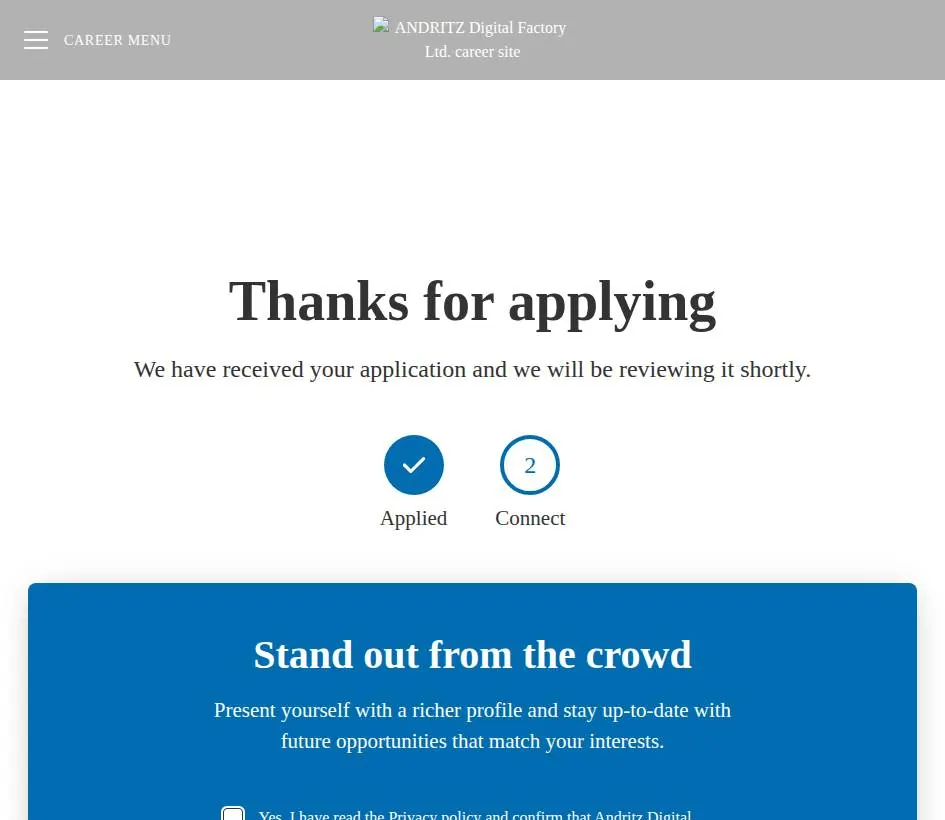
Under the thanks message Teamtailor invites you to "Connect", which is its talent-community sign-up. It's separate from the application; we stop at the thanks page and don't fill it in. Our receipt is the thanks page itself (the address ending in /thanks, or the page that says "we have received your application"), or a redirect to the employer's follow-up survey page.
Why Teamtailor applications fail
- The employer's requirements. Teamtailor lets employers mark questions as must-meet. Answer "no" to one and Teamtailor refuses with a message such as "You have to meet the requirements" (we've seen it in Norwegian and Spanish too). That's a definite refusal, not an error to retry.
- Phone number rejected. When Teamtailor answers "Phone is invalid", the application is recorded as refused with that field named.
- No single application route. A page that advertises zero or several application links isn't guessed at.
- Form didn't appear. Some career sites never render the form; that stops before anything is sent.
- Captcha or video. A form with a captcha widget goes to the browser route, and the quick route can't send a form that requires a video answer.
| Teamtailor, 16 Oct to 15 Nov 2026 | Applications |
|---|---|
| Sent, with Teamtailor's thanks page | 203 |
| Outcome uncertain (mostly verify-email that never arrived) | 27 |
| Couldn't be sent | 27 |
| Waiting for the applicant | 34 |
| Stopped on the employer's form | 17 |
| Closed postings | 13 |
| Refused by the employer's requirements or validation | 9 |
Teamtailor questions that come back to you
Must-meet questions ("Do you have a Swedish work permit?", "Can you work in the office three days a week?") are answered only from what you've told us. When one is new and required, the application waits in your questions, and your answer carries over to the next Teamtailor employer that asks.
Frequently asked questions
Why does Teamtailor ask me to verify my email after applying?
The employer has email verification switched on. The application isn't complete until the link is opened. We open it from your application inbox, checking it belongs to that job first.
Should I click "Connect" after applying?
Only if you want to join that company's talent community. It isn't part of the application, and we stop at the thanks page without touching it.
Do I need a Teamtailor account?
No. Teamtailor applications are guest forms on each employer's career site.
Why did Teamtailor say I don't meet the requirements?
The employer marked a question as must-meet, and the honest answer was no. Teamtailor refuses those automatically; we record it as refused and don't resubmit.
The site is in Swedish. Does that matter?
No. Name labels in the Nordic languages, Italian and Portuguese are recognised, and Nordic pay wording in salary questions is understood.